Usage
In general, the API is designed to be similar to the matplotlib.pyplot API.
To use Matrix Viewer to display a matrix:
import matrix_viewer
import numpy as np

my_matrix = np.array([[1, 2], [3, 4], [5, 6]])
matrix_viewer.view(my_matrix)
matrix_viewer.show()
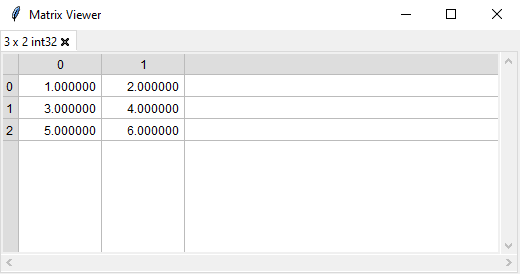
It is also possible to display pytorch tensors.
To use Matrix Viewer to display an object, list, dict or set:
import matrix_viewer
import numpy as np

class MyDemoClass:
    def __init__(self):
        self.species = 'spider'
        self.name = 'arachne'
        self.my_array = np.array([[1, 2, 3], [4, 5, 6]])

matrix_viewer.view(MyDemoClass())
matrix_viewer.show()
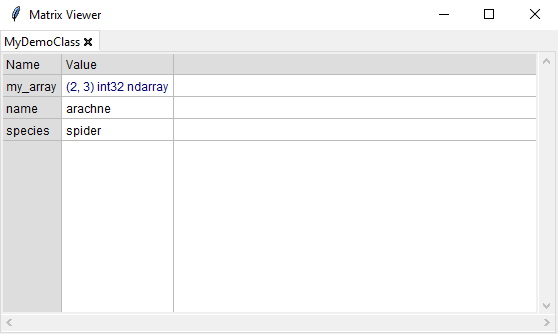
One can traverse through attributes by clicking on the appropriate value. For example, clicking on my_array will show the matrix in a new tab.
It is also possible to use it concurrently with matplotlib.pyplot:
import matrix_viewer
import matplotlib.pyplot as plt
import numpy as np

my_matrix = np.random.rand(10, 5)  # creates a 10 x 5 matrix filled with values from 0..1
my_curve = [1, 3, 2, 7, 8, 10]

matrix_viewer.view(my_matrix)
plt.plot(my_curve)
matrix_viewer.show()  # this shows up all matrix viewer and pyplot windows / figures and blocks until all windows are closed.
It is possible to create multiple windows with multiple tabs like this:
matrix_viewer.view([[1, 2], [3, 4]])  # the first window is alwasy created automatically

matrix_viewer.viewer()  # creates a second window
matrix_viewer.view(np.random.rand(100, 200))
matrix_viewer.view(['teststring', [False, True]])  # new tabs are by default added to the most recently created window
There is also a more object-oriented API:
win1 = matrix_viewer.viewer(title='Please click a cell')
tab1 = win1.view(np.array([[1, 2], [3, 4]]))

win2 = matrix_viewer.viewer()
win2.view(np.random.rand(100, 200))
win2.view(['teststring', [False, True]])

print('user selected the following cell:', tab1.get_focused_cell())